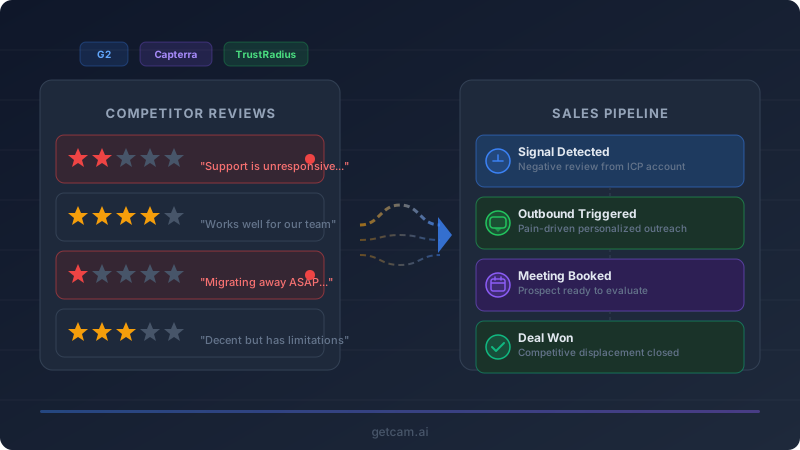
Every week, your competitors’ customers are publishing detailed accounts of exactly what’s broken, what’s frustrating, and what they wish were different. They’re doing it publicly, on platforms like G2, Capterra, and TrustRadius. And most sales teams are ignoring it completely.
That’s a mistake. Competitor review sites are one of the most underused sources of competitive intelligence available today. A single negative review on G2 tells you more about a competitor’s product gaps than a month of feature comparison spreadsheets. A pattern of negative reviews tells you which accounts are ready to switch.
The challenge has never been about access — these reviews are public. The challenge is tracking them consistently, identifying the patterns that matter, and turning those signals into timely sales action. That’s the workflow we’re going to break down.
Why Review Sites Are Gold Mines for Competitive Intelligence
B2B review sites occupy a unique position in the competitive landscape. Unlike marketing content, which is carefully controlled, or analyst reports, which are infrequent and expensive, customer reviews are unfiltered, continuous, and specific.
Here’s what makes them so valuable for sales teams:
Reviews describe problems in the customer’s own language. When a customer writes “the reporting module is so slow that my team has stopped using it,” that’s not just product feedback — it’s the exact pain language your SDRs should be using in outbound. It’s the opening line of a conversation that sounds empathetic, not salesy, because it reflects real frustration.
Reviews are time-stamped. A negative review posted last week represents a customer who is actively frustrated right now. That’s fundamentally different from a competitive insight that’s six months old. Timing is everything in competitive displacement, and review sites give you a real-time signal about account-level dissatisfaction.
Reviews often identify the reviewer’s company and role. On G2 and TrustRadius especially, many reviewers include their company name, industry, company size, and job title. That means a negative review isn’t just an abstract data point — it’s a qualified lead with a known pain point at a named account.
Review patterns reveal systemic issues. One negative review about onboarding could be an anomaly. Fifteen negative reviews about onboarding over two quarters is a structural problem. That pattern tells you that every new customer your competitor signs is going to hit the same wall — and that’s a story you can tell in every sales conversation.
What Signals to Track on G2, Capterra, and TrustRadius
Not all review activity is equally useful. The most productive competitive monitoring focuses on specific signals that translate directly into sales opportunities.
Star Rating Drops and Negative Review Spikes
The most obvious signal is a sudden increase in negative reviews or a drop in average rating. If a competitor that typically maintains a 4.3-star average on G2 drops to 3.8 over a quarter, something meaningful has changed. Maybe they shipped a bad product update. Maybe they restructured their support team. Maybe they raised prices and customers are angry. Whatever the cause, the effect is the same: their customer base is more open to alternatives than it was three months ago.
Track the competitor’s overall rating trajectory, but also track the volume and velocity of negative reviews. Five one-star reviews in a single month is a stronger signal than a gradual decline over six months.
Recurring Complaint Themes
Individual reviews are interesting. Themes are actionable. When you see the same complaint surface across multiple reviewers — slow support response times, a confusing migration process, features being deprecated without warning — you’ve identified a structural weakness you can sell against.
The most valuable themes to monitor are the ones where your product genuinely excels. If competitors keep getting dinged for poor API documentation and your API docs are a strength, that’s a direct sales angle. If they’re losing points on implementation timelines and your average deployment is half the length, that’s a battlecard you can build.
Reviews From Your ICP
A negative review from a 50-person startup might not be relevant if you sell to the enterprise. But a negative review from a Director of Operations at a 2,000-person company in your target vertical is an immediate outbound trigger. Filter reviews not just by sentiment, but by whether the reviewer matches your ideal customer profile.
CAM makes this practical by automatically monitoring competitor review profiles and surfacing new reviews that match the signal criteria you define — so your team doesn’t need to manually check G2 every morning.
Competitor Response Patterns
How a competitor responds to negative reviews — or whether they respond at all — is intelligence in itself. A competitor that ignores negative reviews is telling you their customer success organization is either overwhelmed or doesn’t prioritize public feedback. A competitor that responds defensively (“that feature actually works fine if you configure it correctly”) is telling you they don’t listen well. Both patterns are useful in positioning conversations.
Turning Negative Reviews Into Outbound Triggers
Monitoring is only half the equation. The real value comes from connecting review signals to sales action. Here’s a practical framework for doing that.
Step 1: Set Up Continuous Monitoring
Manual review tracking doesn’t scale. If you’re watching five competitors across three review platforms, that’s fifteen sources to check regularly. You need automated monitoring that surfaces new reviews as they appear and flags the ones that matter.
With CAM, you can set up competitor monitoring that tracks review activity across G2, Capterra, TrustRadius, and other platforms. The tool identifies changes in review sentiment, new negative reviews, and emerging complaint patterns — then delivers those signals to your team automatically.
Step 2: Qualify the Review as an Outbound Signal
Not every negative review warrants outbound. Before routing a signal to your sales team, run it through a quick qualification filter:
- Is the reviewer identifiable? Can you determine the company, title, and industry from the review profile? If the reviewer is anonymous with no company details, the signal is still useful for battlecard content, but it’s not an outbound trigger.
- Does the reviewer match your ICP? Check company size, industry, geography, and persona against your target segments. A perfect ICP match with a strong negative review is the highest-priority signal.
- Is the pain point something you solve? If the reviewer is complaining about pricing and your product costs more, that’s not your lead. Focus on reviews where the stated frustration aligns with a genuine advantage you offer.
- Is the timing right? Reviews posted in the last 30 days are significantly more actionable than older ones. The frustration is fresh, the problem is likely unresolved, and the reviewer may still be in evaluation mode.
Step 3: Craft Review-Informed Outreach
The outreach that works here is empathy-driven, not product-driven. You’re not saying “I saw your bad review of [Competitor].” You’re leading with the pain point the reviewer described — without referencing the review itself.
Here’s a practical template:
Hi [Name], I work with several [industry] teams that were struggling with [specific pain point from review — e.g., “getting reliable data out of their reporting tools without waiting minutes for dashboards to load”]. We built [your product] specifically to solve that. Would it be worth a 15-minute conversation to see if we could help your team at [Company]?
The review gives you the pain language. Your job is to use that language naturally, without making the prospect feel surveilled.
Step 4: Build Battlecard Content From Review Themes
Beyond individual outbound, competitor review themes should feed directly into your sales enablement materials. When your sales team encounters the same competitor in a deal, the most persuasive thing they can say isn’t “our product is better.” It’s “here’s what their own customers say about [specific problem], and here’s how we handle it differently.”
Compile recurring negative themes into competitive battlecards that include:
- The most common complaints, in customers’ own words
- Your product’s specific answer to each complaint
- Case studies or proof points from customers who switched from that competitor
Update these battlecards quarterly, or whenever a significant new complaint pattern emerges.
Step 5: Feed Signals Into Your CRM and Sequences
For this workflow to be sustainable, it needs to plug into the tools your sales team already uses. Review signals should flow into your CRM as account-level intelligence, tagged to the relevant competitor and pain point. If you’re using a sales engagement platform, negative review signals can trigger automated sequence enrollment for accounts that match your ICP criteria.
CAM integrates with your existing workflow tools so that review signals don’t live in a separate dashboard your team forgets to check. The intelligence shows up where your reps already work — in their CRM, in Slack, in their morning briefing.
A Practical Workflow Example
Here’s what this looks like end-to-end for a sales team selling a project management platform:
-
Monday morning: CAM alerts your team that Competitor X received four new G2 reviews over the weekend, three of which are two-star ratings. The primary complaints are about a recent UI overhaul that broke existing workflows and poor communication from the vendor during the transition.
-
Monday mid-morning: Your sales ops lead reviews the alerts. Two of the three negative reviewers are identifiable — a VP of Operations at a 500-person logistics company and a Program Manager at a 1,200-person professional services firm. Both match your ICP.
-
Monday afternoon: Your SDRs send personalized outreach to both accounts, leading with the pain point (“teams that rely on consistent workflows and can’t afford disruption during tool transitions”). Neither message references the review.
-
Ongoing: Your competitive intelligence lead adds “UI change broke workflows” and “poor vendor communication during transitions” to the Competitor X battlecard. Your AEs start weaving this into positioning whenever Competitor X appears in a deal.
-
End of quarter: Your team reviews all competitor review signals from the past 90 days. Competitor X’s G2 rating has dropped from 4.4 to 4.1. Your marketing team uses this trend in a competitive comparison landing page. Your SDR team runs a targeted campaign to Competitor X’s customer base.
Making Review Intelligence a Competitive Advantage
Most B2B sales teams treat competitor reviews as something to glance at during deal prep. The teams that win consistently treat them as a continuous intelligence source — one that reveals real-time dissatisfaction, names specific accounts, and provides the exact language prospects use to describe their problems.
The key is making review monitoring automatic and connecting it to action. If your team has to remember to check G2 every week, it won’t happen consistently. If the signals show up automatically, qualified and contextualized, they become part of your sales motion rather than a side project.
CAM was built to close this gap — to turn the public signals your competitors’ customers are already sharing into timely, actionable intelligence your sales team can use to start the right conversations at the right moment.
The reviews are already out there. The question is whether your team is listening.