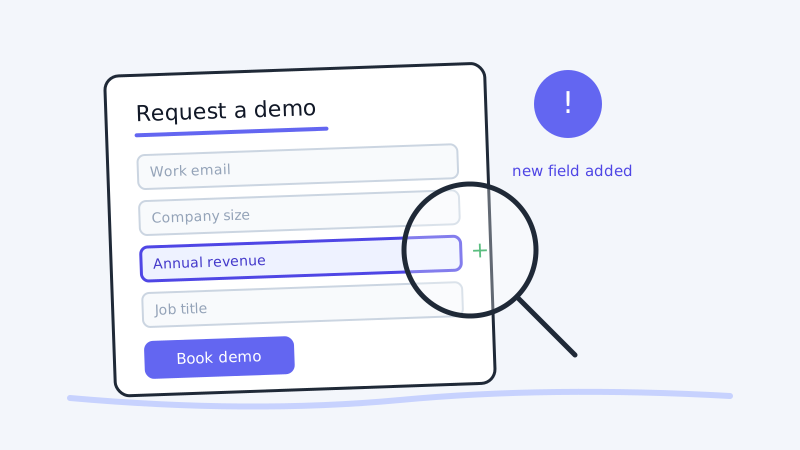
Most competitive intelligence looks at the loud surfaces: pricing, features, positioning on the homepage. But one of the most revealing pages a competitor publishes is the one almost nobody studies, the demo request or free signup form. The fields on that form are not decoration. Every field is a deliberate choice about what a company needs to know before it will spend a human on a lead. Change the fields and you change who gets through. That makes the form a live readout of a competitor’s ideal customer profile and their lead qualification logic.
This post is about reading that readout. When you capture a competitor’s signup and demo forms over time and compare versions, you can reverse-engineer who they are trying to sell to, how they route and score leads, and where their go-to-market is quietly turning. Almost no one on the sales side is watching for it.
Why form fields are a confession, not a formality
Growth and marketing teams agonize over form fields. Every field added to a form measurably lowers conversion, so companies only add one when the information is worth the drop-off. That tension is what makes the form honest. A field survives on the form only if the data it collects changes what happens to the lead. So the set of fields is a compact statement of what a company must know to qualify and route a prospect.
Read that way, a demo form tells you several things at once.
Who they consider a real buyer. A form that asks for “company size” or “number of employees” and gates the smallest option is signaling a floor. If the smallest bucket is “50 to 200,” they are not chasing the ten-person startup. If they add an “annual revenue” or “annual recurring revenue” field, they have started qualifying on deal size, which usually means a move upmarket.
How they segment. An “industry” dropdown tells you which verticals they route to specialists. A “use case” field tells you which jobs-to-be-done they organize their sales motion around. When the options in those dropdowns change, their segmentation strategy is changing with them.
What disqualifies you. A “current tools” or “how did you hear about us” field is often a routing and competitive-intel mechanism. A required “work email” with a blocked free-email domain says they will not talk to personal Gmail addresses, which tells you they have given up on pure product-led self-serve for that motion.
How much friction they will tolerate. The sheer number of fields maps to how sales-led the motion is. A two-field form is product-led growth. A twelve-field form with phone number required is a classic enterprise, human-qualified motion. When a competitor’s form grows or shrinks, the motion behind it is being rebuilt.
None of this shows up if you look at the form once. It only becomes intelligence when you capture it repeatedly and compare.
What specific changes actually tell you
Changes to a lead-capture form are rarely accidental. Someone in revenue operations or growth decided the trade-off was worth it. Each edit is a signal.
When a competitor adds a revenue, budget, or company-size field, they are raising the qualification bar. They want bigger deals and are willing to lose small prospects to get them. That is a direct opening for you to win the down-market segment they are walking away from.
When a competitor removes fields and simplifies the form, they are reducing friction, usually to chase volume or launch a self-serve motion. That often precedes a new free tier or a product-led push. It can also mean their pipeline is thin and they need more top-of-funnel at any cost.
When a competitor adds a phone-number-required field or “schedule a call” step, they are moving from self-serve toward human-qualified sales. That tells you their average contract value is climbing and their sales cycle is lengthening, both useful facts in a competitive deal.
When a competitor changes the dropdown options for industry, role, or use case, they are re-segmenting. New verticals in the list mean a new market focus. A role that disappears means they stopped selling to that persona.
When a competitor adds a “current solution” or “what are you using today” field, they have started competitive routing. They want to know if you are in the deal so they can hand it to a closer with a battlecard. That is a strong hint that they see you as a live threat.
Every direction of change is information. You only need to be watching when it happens.
Turning the signal into a sales play
A form change is only worth tracking if your reps can do something with it. Here is how each pattern converts into action.
If a competitor moves upmarket, brief your team on the segment they just abandoned. Build outbound around the prospects who no longer clear the competitor’s qualification bar. Tools like Kali let you run that outbound as calendar-invite outreach so those newly-orphaned prospects land straight in a booked demo rather than a crowded inbox. Pair it with clean data from Scrubby so the list you are working is deliverable before a rep ever touches it.
If a competitor simplifies to a self-serve motion, expect them to compete on speed and price rather than white-glove onboarding. Position your high-touch qualification as a feature, not a friction point, for buyers who want guidance.
If a competitor adds competitive routing, assume every deal you share is now being actively worked. Tighten your discovery and get your differentiation in front of the buyer before the competitor’s closer does.
If a competitor re-segments into a new vertical, treat it as an early warning. They are about to build content, case studies, and outbound aimed at that industry. You can either defend the accounts you hold there or decide to cede the segment on purpose, but either way you get to choose instead of being surprised.
Why manual checking does not work
The obvious approach is to open the competitor’s demo form now and then and eyeball it. It fails for the same reasons manual competitive intelligence always fails.
Form changes are small and easy to miss. A single added field, a reordered dropdown, or a newly required phone number will not jump out at a human who is skimming. Worse, forms are often rendered dynamically and gated behind a click, so the change is invisible unless you actually load the page and interact with it. And the moment the competitor ships the new version, the old one is gone. Unless you captured the previous state, you cannot prove the form used to ask for less, which is the exact before-and-after evidence that makes the signal persuasive inside your own company.
Lead-capture forms have to be captured continuously and stored, or the change is invisible by the time it matters.
How to set up form monitoring
Treat it as a monitoring task, not a habit you have to remember.
This is precisely the recurring, difference-based monitoring that CAM is built for. Point it at the competitor’s demo request page and free signup page, and it watches those specific pages for meaningful changes, ignores cosmetic noise like rotating testimonials or tracking parameters, and keeps a durable record of what the form asked for before and after. Instead of hoping you reloaded the page on the right day, you get an alert the moment the fields change and a side-by-side history you can cite in a battlecard or a pipeline review.
A practical setup looks like this:
-
List the forms worth watching. For each priority competitor, capture the primary demo request form, the free trial or signup form, and any “contact sales” form. These often behave differently and reveal different motions.
-
Monitor the rendered form, not just the URL. Many forms load their fields with JavaScript or reveal them after a click. Make sure whatever you use captures the actual fields a prospect sees, not an empty container.
-
Watch for structural changes, not styling. You care about fields added or removed, requirements changed, and dropdown options edited. You do not care about a new background color. Filter for the former.
-
Route alerts to the people who act on them. A form change belongs in front of your competitive intelligence lead and your revenue operations team, because it usually implies a qualification or routing change on your side too.
-
Keep the history. The value compounds. One change is a data point. Six months of changes is a map of how a competitor’s go-to-market is evolving, and that map is what turns a single alert into a strategy conversation.
The takeaway
A competitor’s pricing page tells you what they charge. Their demo form tells you who they are willing to charge, and that is often the more strategic fact. The fields on that form are a public, continuously updated declaration of their ideal customer profile and their qualification logic. When those fields change, the competitor is telling you their go-to-market is moving, usually before it shows up anywhere else.
The only requirement is that you are watching when it happens and that you kept the old version to compare against. Set the monitoring up once with CAM, route the alerts to the people who run your sales motion, and you turn a page nobody studies into one of the earliest signals you have.